
Subscription Management
In the settings, which you can find in the app menu A, tap "Subscription" B. Here you can sign the GDPR C and manage your current edoobox subscription D. You can find an overview of all edoobox subscriptions on our website.
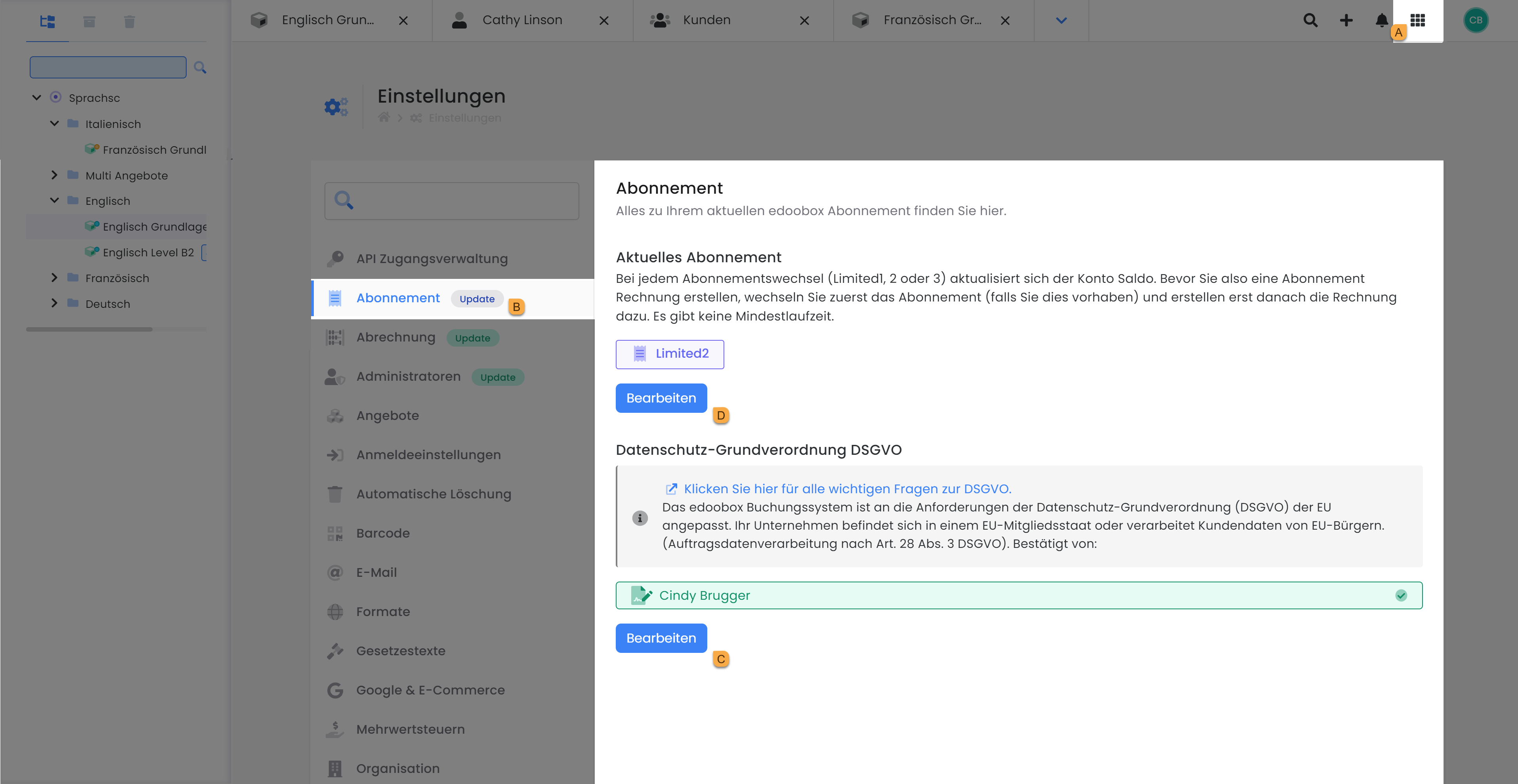
For collaboration with edoobox, the signing of the Data Processing Agreement is required. Manage your subscription independently within the settings under 'Subscription' by selecting the appropriate package, from Limited 1 to Enterprise 3, at any time and without limitation.
General Data Protection Regulation (GDPR)
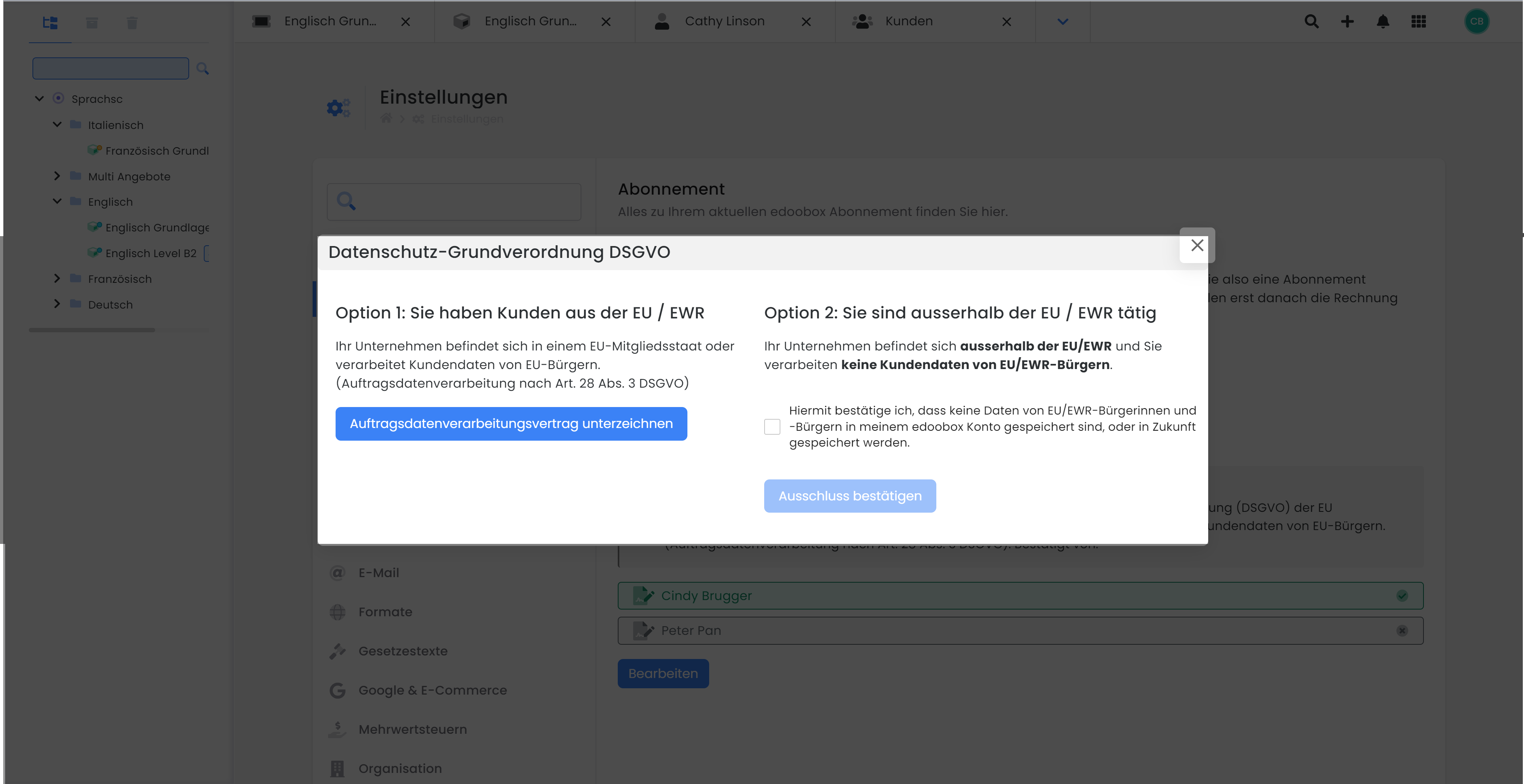
edoobox is GDPR-compliant. To ensure compliance, please sign our Data Processing Agreement ( ) using a digital signature in the subscription settings under"Edit," and specify the region from which your customer account originates.
-
Option 1: You have customers from the EU / EEA
-
Option 2: You operate outside the EU / EEA
Current Subscription
In this section , you can view your current subscription and switch to a different plan at any time. Select the subscription that best meets your needs, and be sure to review the features included with each plan. If you wish to downgrade your subscription, please review the section on system messages regarding subscription downgrades, as certain features may no longer be available in the new subscription.
Tip: Changing Subscriptions
Your account balance is updated with every subscription change. Therefore, if you have planned a subscription change and wish to settle your account balance, we recommend first making the subscription change and then generating the invoice for your outstanding balance.
Free Test Mode
Upon registering with edoobox, you receive a 10-day test mode. During this test mode, all edoobox functions are available for comprehensive testing. If required, we offer two complimentary 30-minute online introductions to provide an overview of edoobox's key features and discuss your specific requirements.
Limited 1 Subscription
For basic use of core functions – the default settings allow you to get started immediately. The Limited 1 subscription provides 10 offers for publication, with a maximum of 25 participants per offer. Additionally, it includes the option to publish two different price categories per offer.
The fixed monthly subscription fees are charged to your edoobox account at the end of the month. edoobox charges no additional fees; the number of bookings is irrelevant.
Naturally, written online guides are available 24/7, providing detailed explanations of individual areas and functions within edoobox. If your questions cannot be resolved with the guides, edoobox support for the Limited 1 subscription can be contacted via email (support@edoobox.com).
Limited 2 Subscription
Perfect for a compact product portfolio – with Limited 2, you already utilize almost all functions edoobox offers. You have 25 offers available for publication, along with 100 participants who can book per offer. In Limited 2, you have a total of four price categories that can be activated per offer.
The fixed monthly subscription fees are charged to your edoobox account at the end of the month. edoobox charges no additional fees; the number of bookings is irrelevant.
In addition to the functions of the Limited 1 subscription, the following features are available:
Email Templates
edoobox includes many pre-configured email templates. Based on these templates, emails are generated when a specific event occurs (e.g., when a booking is completed or the minimum/maximum number of participants is reached). From the Limited 2 subscription onwards, email templates can be individually customized. For this purpose, utilize the predefined placeholders to tailor your emails to your offers and participants. A separate email template can be created for each activated language.
Extend Participant Data Fields
This function allows you to create custom data fields for your edoobox account. This provides the flexibility to create diverse and extended registration forms, ensuring you always collect all necessary customer data for your offers. For instance, you might want to request different data fields in a registration form for adults compared to one for children.
Single Appointment Booking
Enable your customers to book individual appointments for your offer. Changes to the registration type are possible as long as no bookings have been made yet.
edoobox Support via Phone
From the Limited 2 subscription onwards, in addition to email support, you have the option to contact us by phone for support inquiries.
Limited 3 Subscription
Launch with all functions – with Limited 3, you have up to 80 offers available for publication, with a total of 250 participants per offer. A total of ten different price categories can be activated per offer.
The fixed monthly fees are charged to your edoobox account at the end of the month. edoobox charges no additional fees; the number of bookings is irrelevant.
In addition to the functions of the Limited 2 subscription, these features are available:
Internal Offers
From Limited 3 onwards, you have the option to use the internal offers function. Internal offers are not discoverable by search engines and can, for example, be integrated into your intranet for company-internal courses and seminars. edoobox offers two options here:
-
Set entire edoobox account to internal: With this option, none of your offers in your edoobox account will be found by search engines.
-
Switch individual categories to internal: In a public edoobox account (not set to internal), individual main categories can be set to internal. This allows you to manage both public and internal offers within the same edoobox account.
Please note: Switching from public to internal
The link to your offers changes when you switch your edoobox account or a main category to 'internal'. Only generate the link to your offers or the code for the iFrame after this option has been definitively set.
Business Subscription
Flexibility with all features – with the Business Subscription, all edoobox features are available to you. The booking fee is charged to your edoobox account immediately after each booking. Therefore, ensure sufficient coverage of your account balance. In the edoobox Business Subscription, the balance must be positive, otherwise you will automatically receive a payment reminder.
Info: Booking Fee
Booking fee per booking: 1.00 EUR/CHF plus 1% of the booking value.
Tip: Plan account balance in advance
Transfer the estimated amount for bookings for a specific period in advance (e.g., one month or half a year) to ensure your account balance always remains positive.
Enterprise 1
For professionals with additional needs – do you require more than 80 offers or more than 250 slots per offer? With the Enterprise Subscriptions, you benefit from all edoobox features and an increased number of offers, participants, and price categories.
With Enterprise 1, you have the option to publish 150 offers and enable up to 300 participants to book an offer per offer. Ten different price categories can be created and offered per offer.
The fixed monthly subscription fees are charged to your edoobox account at the end of the month. edoobox charges no additional fees; the number of bookings is irrelevant.
Enterprise 2
For an expanded product range and large-scale events – Enterprise 2 allows you to publish 200 offers simultaneously. A maximum of 400 participants can book into a single offer. Additionally, with Enterprise 2, you have a total of 15 price categories that you can create per offer.
The fixed monthly subscription fees are charged to your edoobox account at the end of the month. edoobox charges no additional fees; the number of bookings is irrelevant.
Enterprise 3
Our most comprehensive package at a fixed price – with Enterprise 3, a total of 400 offers can be published simultaneously, with a maximum of 500 participants able to book into each. 20 different price categories can be created and offered per offer.
The fixed monthly subscription fees are charged to your edoobox account at the end of the month. edoobox charges no additional fees; the number of bookings is irrelevant.
Tip: Need a larger subscription?
If even our largest subscription is not sufficient for you, do you need more than 400 offers or more than 500 slots per offer? Please feel free to contact us for a non-binding quote: edoobox – The individual solution for you
System messages regarding subscription downgrade
In the main navigation under 'Settings' > 'Subscription', you can change your subscription yourself at any time. However, you may receive a system message indicating that a downgrade was prevented. The various system messages will inform you why the downgrade is currently not possible or what you can do to perform a downgrade.
|
Message |
Description |
What to do for the downgrade |
|---|---|---|
|
Reduce the number of published offers |
Too many offers are simultaneously available for online booking |
Set offers to Draft status or otherwise ensure that fewer offers are published. |
|
Reduce the maximum number of participants per offering. |
The maximum number of participants in one or more offerings is too high. |
Reduce the maximum number of participants in the affected offerings to comply with the limit of the desired subscription plan. |
|
You have additional form fields active. Deactivate all active additional fields. |
Custom participant data fields are active (available from Limited 2). |
Deactivate the custom participant data fields in the «Settings». |
|
An export connection to another company is active. Deactivate all export connections. |
Your edoobox account is connected to another edoobox account (available from Limited 2). |
Deactivate the export connections in the iFrame tab. |
|
Currently, all offerings are in internal mode. Deactivate this mode. |
Individual categories or the entire edoobox account are set to internal (available from Limited 3). |
Deactivate the internal mode for the individual categories or the entire edoobox account. |
|
Currently, you have at least one OAuth2 provider active. Deactivate all personal providers. |
You have one or more external login providers activated (available from Limited 3). |
Deactivate all external login providers in the edoobox settings. |
|
You have reached the maximum number of active price categories per offering. |
Too many price categories are activated in one or more offerings. |
Deactivate price categories in the offerings to comply with the limit of the desired subscription plan. |
Delete edoobox account
Should you wish to delete your edoobox account, in V1 within the edoobox settings, you will find the «My edoobox Subscription» box, which contains the button to delete your edoobox account. If your testing period has expired, the delete button is located at the bottom of the lock screen.
Please note that the following conditions must be met for you to successfully delete your account:
-
The account can only be deleted by a Super Administrator.
-
Have your password ready, as it will be requested during the deletion process.
-
Please settle your account balance beforehand if it is negative.
-
Ongoing subscription costs must be available as a credit balance in the account.
-
Deletion can only be performed by you using the delete button.
Related Guides
Keywords for this guide
Enterprise ¦ Subscription ¦ Subscription ¦ Limited ¦ Business ¦ Invoice ¦ GDPR ¦ Cancel ¦ Cancellation