
In the organization settings, you store central information about your company – such as name, address, website, phone number, email address, language, currency, and an optional alternative billing address for your edoobox subscription. This information forms the basis for system notifications, billing for your edoobox subscription, the signature of your emails, and the public address in your booking process.
Edit Organization Settings
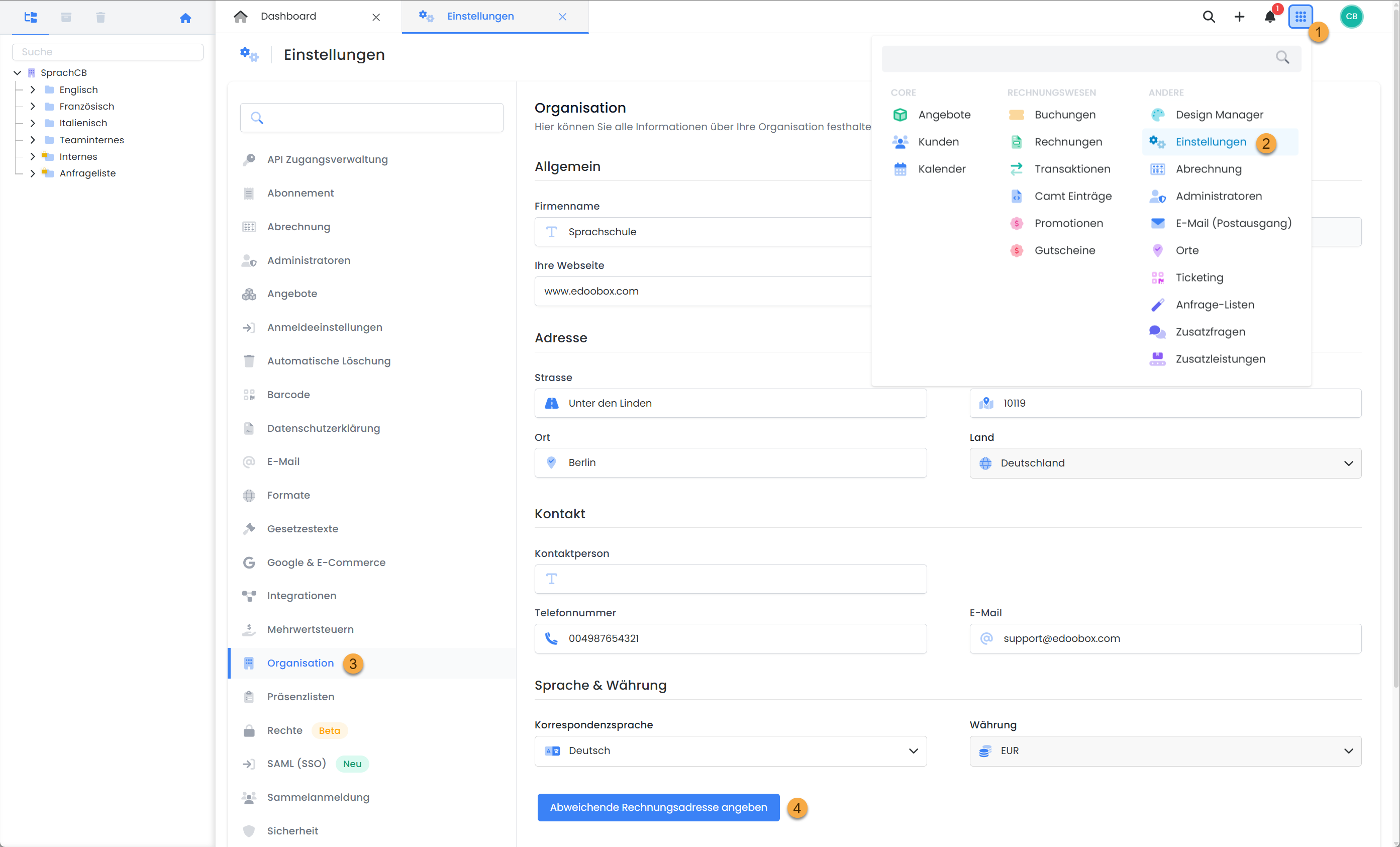
The following information can be managed in the App menu under Settings > Organization:
-
Company Name and Contact Details
-
Email Address for System Notifications
-
Alternative Billing Address for the edoobox Subscription
Currency and account abbreviation cannot be changed. If you require a change here, please contact support at support@edoobox.com
Alternative Billing Address
If the billing address for your edoobox subscription differs from the organization's address, it can be stored separately:
-
Click on the option «Specify alternative billing address» and activate the alternative billing address.
-
Enter the correct address and contact details.
-
Optionally, a separate email address for payment reminders can be defined here.
Info: Display of Account Details
Settings regarding which information about your organization you wish to provide to your customers in the offer details and the corresponding display options can be found in the Design Manager.
Related Guides
Keywords for this guide
Organization ¦ Information ¦ Billing Address ¦ Company ¦ Company Address ¦ Invoice Address ¦ Subscription Fee ¦ Subscription Payments