
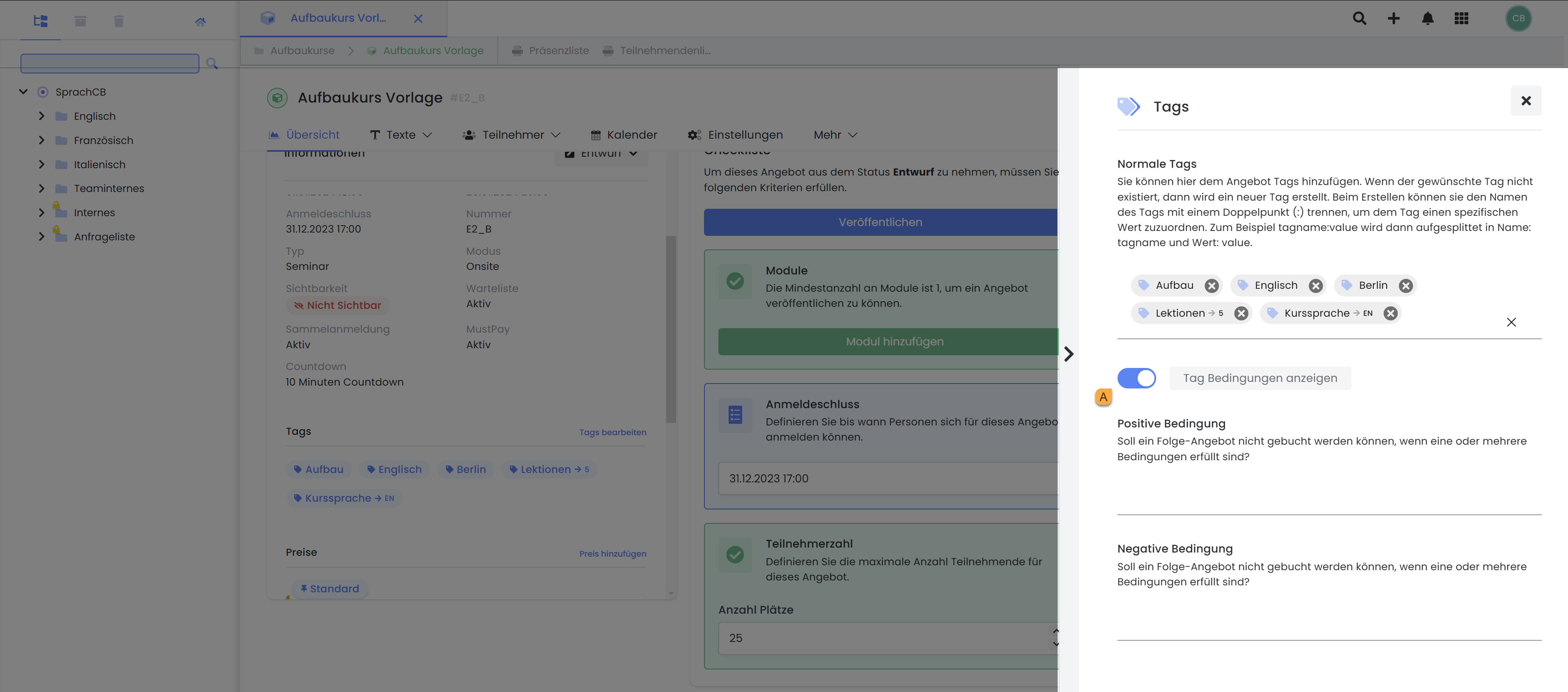
Do you want a follow-up offer to be bookable only if another offer has been booked first, or do you want to prevent participants of a follow-up offer from booking a basic offer? Then we recommend using positive and negative conditions for this. These conditions allow you to enforce a specific booking sequence.
Tip: Apply Tags to Customers
In the Participant Dashboard, you can also assign tags to participants to categorize them into different groups, for example, as members. These tags can then be stored as validity criteria in a promotional campaign. This ensures that the promotion can only be utilized by participants with the corresponding tag.
Positive Conditions
You have the option to set positive conditions for an offer. This means that the booking of a prerequisite offer must be completed first before a participant can register for the current offer. This is relevant if you want to prevent participants without prior knowledge from booking a follow-up offer.
Procedure:
-
In the basic offer, which you set as a prerequisite for the follow-up offer, you apply the desired tags as usual (Link to Tagging an Offer).
-
In the follow-up offer, you set the "desired" tags as positive conditions.
This approach ensures that only participants who have already booked the required prerequisite courses are admitted to a follow-up course. It is crucial that the prerequisite course precedes the follow-up course chronologically. Multiple prerequisite courses can also be set as positive conditions.
Example: One Course as a Condition
For the Advanced English course, we only want registrations from individuals who have already booked the English Basic Course. Therefore, in the Advanced English course, we set the tag "English Basic Course" as a positive condition. We previously assigned this tag to the English Basic Course.
Example: Multiple Courses as a Condition
For the Chemistry: Advanced course, you want to require either the Chemistry: Part 1 and Chemistry: Part 2 courses or the Chemistry: Combo course.
-
Assign the tag "Chemistry: Part 1" to the Chemistry: Part 1 course.
-
Assign the tag "Chemistry: Part 2" to the Chemistry: Part 2 course.
-
Assign the tags "Chemistry: Part 1" and "Chemistry: Part 2" to the Chemistry: Combo course.
-
Finally, in the Chemistry: Advanced course, you must define "Chemistry: Part 1" and "Chemistry: Part 2" as positive conditions.
Negative Conditions
If you want to prevent advanced participants from booking a basic course, or if a course should not be booked twice by the same person, then use negative conditions. This means that you define all "forbidden" tags as negative conditions within the basic course. This approach ensures that no advanced participants, who are enrolled in a course with "forbidden" tags, can register for the basic course.
Examples: Blocking Another Course
For the English Fundamentals course, we do not want registrations from individuals who have already booked the Advanced English course. Therefore, in the English Fundamentals course, we set a negative tag "Advanced English". We previously assigned this tag to the Advanced English course.
Examples: No Duplicate Booking for the Same Course
We want to prevent the Christmas Dinner course from being booked twice by the same participant. Therefore, in the Christmas Dinner course, we assign the tag "Christmas Dinner" and additionally set this tag as a negative condition. This ensures that the course can only be booked once.
Further Information and Limitations
-
Conditions are only effective for frontend bookings, i.e., bookings made by participants. For bookings made in the backend by administrators, the conditions are not effective.
-
A condition is only correctly effective if the follow-up course starts chronologically after or at the end time of the prerequisite course.
-
Participants must be logged in. Only then can existing bookings be checked against conditions. If this is not the case, a negative condition will not be effective.
-
Tagging with conditions only works conditionally with the registration type Flexible Date Selection, because the start and end dates of the course are used for verification, not the effectively booked dates.
-
If a link is accessed with a tag that is not present in that link, a link to the root directory with a tag filter for the requested tag will always be created.
-
For a group registration, the group participants must be entered using the identification function, as this is the only way the system can determine whether the set conditions are met for each group participant. Please refer to the master participant and identification field settings in the edoobox settings.
-
Tagging with conditions is effective for quotes with the statuses Published, Guaranteed Execution, Closed, and Approved. Quotes in the archive are also taken into account.
Tags and conditions for quotes with the statuses Draft and Canceled are not effective .
Tip: Information for Participants
We recommend that you inform participants in the course description which courses must be booked in advance to enable booking of further courses. Similarly, it is advisable to disclose any conditions that would preclude a booking.
Related Guides
Keywords for this guide
Condition ¦ Enforce Order ¦ Requirement